 Rotimi Best
06c3a7feba
Rotimi Best
06c3a7feba
* feat(ui): add Page.SettingsActions for settings save bar

Introduce a sticky bottom save/discard bar on Page and migrate settings
pages to use it instead of header or inline save buttons. Includes
profile, org, customize-lms, notifications, auth, AI tutor, course
settings, certificates, and cohort settings.

Co-authored-by: Rotimi Best <rotimi-best@users.noreply.github.com>

* fix(ui): always show Page.SettingsActions, disable when clean

Keep the settings save bar visible at all times and disable Save and
Discard when hasChanges is false instead of hiding the bar entirely.

Co-authored-by: Rotimi Best <rotimi-best@users.noreply.github.com>

* fix(ui): add bottom spacing and shadow to Page.SettingsActions

Wrap the actions card in a sticky container with bottom padding so it
does not sit flush against the viewport edge, and use shadow-md on the
card for clearer elevation.

Co-authored-by: Rotimi Best <rotimi-best@users.noreply.github.com>

* fix(ui): stop viewport-sticking Page.SettingsActions on scroll

Remove sticky bottom positioning so the save bar stays at the end of the
page content and scrolls away when viewing upper sections.

Co-authored-by: Rotimi Best <rotimi-best@users.noreply.github.com>

* fix(ui): use sticky bottom for Page.SettingsActions dock behavior

Replace the IntersectionObserver fixed/dock toggle that caused layout
thrashing and flipping with native position: sticky; bottom: 0. Move
overflow-x-hidden from Page.Root to Page.Body so sticky is not broken.

Co-authored-by: Rotimi Best <rotimi-best@users.noreply.github.com>

* fix(ui): keep Page.SettingsActions sticky and above editor content

Page.Root carried md:overflow-x-auto, which makes overflow-y compute to
auto, turning the root into the sticky bar's nearest scrolling ancestor.
Since the root sizes to its content it never scrolls internally, so the
bar rendered at its natural flow position instead of pinning to the
viewport. Drop the overflow so sticky resolves against the viewport;
horizontal containment stays on Page.Body.

Raise the bar to z-50 so it is not painted over by the editor root,
which is relative z-50. Matching rather than exceeding 50 keeps
body-portaled dialogs and sheets above the bar.

Show the shadow only while the bar is pinned away from its flow
position, tracked with an IntersectionObserver on a 1px sentinel
sibling. Unlike the previous observer this toggles a box-shadow only, so
it cannot feed back into layout.

* fix(ui): tighten settings actions spacing and tab visibility

- Remove mt-6 and lower z-index so popovers sit above the bar
- Wrap sentinel in a single root to avoid extra Page.Root flex gap
- Remove Page.Body mb-4 redundant with settings actions spacing
- Show certificate save bar only on the settings tab
- Raise theme color picker z-index via --picker-z-index

Co-authored-by: Rotimi Best <rotimi-best@users.noreply.github.com>

* fix(dashboard): address PR review feedback for settings actions

- Capture profile/org saved baselines only on initial load, not on edits
- Reset course settings errors with explicit field shape in handleDiscard
- Restore VisitOrgSiteButton on org profile settings header
- Derive AI tutor dirty state from stores directly instead of mirrored state
- Use discard-specific French label and document SettingsActions props

Co-authored-by: Rotimi Best <rotimi-best@users.noreply.github.com>

* docs(ui): clarify Page.Root ownership for Page.SettingsActions

"Last child of Page.Root" is a runtime relationship. Several settings
pages get their Page.Root from a +layout.svelte, so the page file holds
only Page.Header, Page.Body, and Page.SettingsActions. Document that this
is correct and list the pages, since adding a nested Page.Root stacks two
min-height containers and shortens the sticky bar's containing block.

Also document that Page.SettingsActions must never be rendered from
inside Page.Body: overflow-x-hidden makes Page.Body a scroll container
that never scrolls, so a sticky bar in it has no travel.

---------
@cio/ui
UI component library for ClassroomIO, built with Svelte 5 and Tailwind CSS.
Package Information
- Name:
@cio/ui - Type: Svelte component library
- Framework: Svelte 5
- Styling: Tailwind CSS with custom
uiprefix
Folder Structure
packages/ui/
├── src/
│   ├── base/          # Components from shadcn-svelte
│   ├── custom/        # Components from other sources or built on top of base components
│   ├── hooks/         # Reusable Svelte hooks
│   ├── tools/         # Utility functions (cn, sanitize, etc.)
│   ├── index.css      # Global styles
│   └── index.ts       # Main export file
├── package.json
├── components.json    # shadcn-svelte configuration
└── jsrepo.json        # jsrepo configuration
Storybook
We maintain a Storybook instance at packages/storybook to make it easy to browse, visualize, and reuse every UI component in the app. Instead of digging through source code or guessing how a component looks, you can see each piece rendered in isolation with its variants, props, and states documented.
This is especially useful when you're building a new feature and need to find the right existing component — check Storybook first before creating something from scratch.
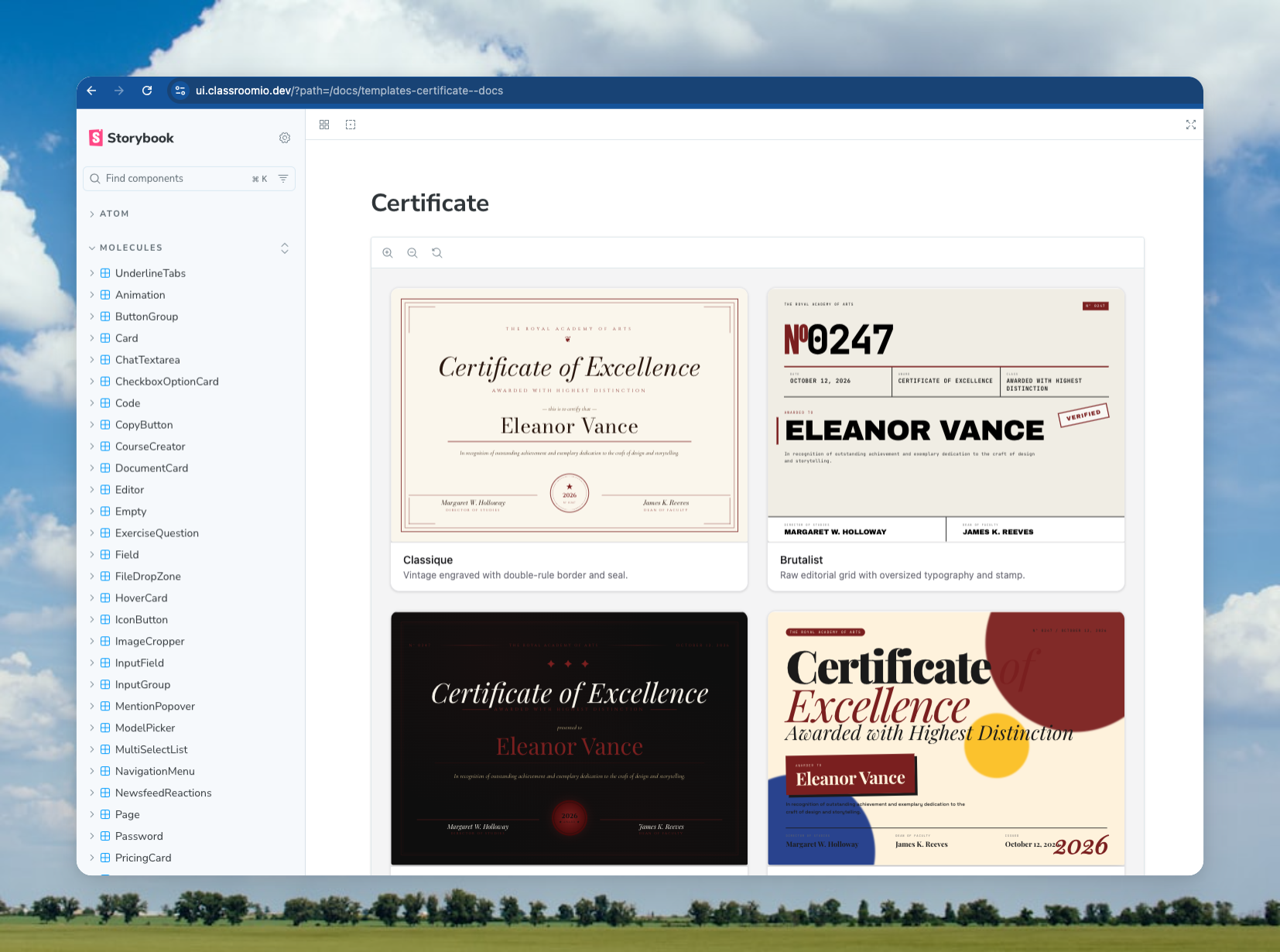
To run it locally:
cd packages/storybook && pnpm dev
See packages/storybook/README.md for detailed instructions on creating stories and publishing.
Content Structure
Base Components (src/base/)
All components in the base directory are primarily from shadcn-svelte. These are the foundational UI components that follow the shadcn design system.
Guidelines:
- Any new component from shadcn-svelte should be added to the
basedirectory - Components are organized in their own folders with an
index.tsfile for exports - Each component folder typically contains the main component file(s) and an
index.tsexport file
Examples:
base/button/- Button component from shadcn-sveltebase/dialog/- Dialog component from shadcn-sveltebase/tooltip/- Tooltip component from shadcn-svelte
Custom Components (src/custom/)
Components in the custom directory come from various sources or are built on top of base components:
-
External Sources:
- Components from shadcn-svelte-extras
- Components from Edra Editor (rich text editor)
- Other third-party component libraries
-
Extended Components:
- Any component that builds on top of shadcn-svelte base components
- Custom implementations that extend base component functionality
Examples:
custom/code/- From shadcn-svelte-extras (syntax-highlighted code block with copy and overflow)custom/underline-tabs/- From shadcn-svelte-extrascustom/editor/- Rich text editor based on Edra/Tiptapcustom/image-cropper/- Custom image cropping componentcustom/checkbox-field/- Field component built on top of base Checkboxcustom/newsfeed-reactions/- Newsfeed reaction picker and summary used by course and program feedscustom/course-creator/- ChatGPT-style course creation input with level and type selects
Exercise question (src/custom/exercise-question/)
Learner and author UIs for exercise questions (take, preview, review, submission, edit per question type).
renderers/shared/— Cross-type presentation pieces reused by multiple question families (for examplelabeled-value-row.svelte,mcq-preview-option-row.svelte,submission-response-pie-chart.svelte). Mode entry files stay thin; add new shared pieces here when two or more types need the same markup.renderers/<question-type>/— One folder per type (radio,numeric, …) containingtake.svelte,preview.svelte, and optionalreview.svelte,submission.svelte,edit.svelte, plus type-specific fragments (for examplenumeric-expected-fields.svelte,ordering-display.svelte).renderers/option-image.svelte,renderers/submission-utils.ts— Existing shared helpers at therenderers/root; keep importing from there unless consolidating in a later pass.
Types with heavier or distinct UIs (textarea editor, file upload, matching/hotspot authoring, link lists) intentionally keep separate take / preview implementations until a second consumer (for example a dedicated review mode) justifies extracting more shared fragments.
Question type picker (src/custom/question-type-picker/)
Marketing / demo widget: left-hand list of question types and a live take-mode preview using ExerciseQuestion.QuestionRenderer. Copy is English-only (no dashboard i18n). Also consumed by the @cio/embeds app as a CDN bundle (apps/embeds).
Live session card (src/custom/live-session-card/)
Presentational card for a live-class lesson with three states (live, upcoming, ended) derived from lessonAt + durationMinutes, or forced via the status prop (used by Storybook). Shows a join/copy action set when live, an "Add to calendar" combo button (Google, Outlook.com, Office 365, Yahoo, plus an .ics download for Apple) and a countdown when upcoming. All copy is passed in via the labels: LiveSessionLabels prop, so the dashboard wrapper supplies translated strings; onCopyLink fires after the link is copied (e.g. for a snackbar). See Molecules/LiveSessionCard in Storybook.
Hooks (src/hooks/)
Reusable Svelte hooks are located in the src/hooks/ directory. These are Svelte 5 runes-based utilities that can be used across components.
Available Hooks:
is-mobile.svelte.ts- Media query hook for mobile breakpointsuse-clipboard.svelte.ts- Clipboard copy functionality with state management
Usage:
<script lang="ts">
  import { isMobileStore } from '@cio/ui/hooks/is-mobile.svelte';
  import { UseClipboard } from '@cio/ui/hooks/use-clipboard.svelte';
</script>
Tools (src/tools/)
Utility functions and helpers are located in src/tools/. The main utility is the cn function for class name merging.
Page layout (src/base/page/)
Composable page shell used across dashboard list and settings screens. Import as import * as Page from '@cio/ui/base/page'.
| Export | Purpose |
|---|---|
Page.Root |
Flex column wrapper with minimum viewport height |
Page.Header |
Title row; pass isSticky to pin the header while scrolling |
Page.HeaderContent |
Title + subtitle column |
Page.Title / Page.Subtitle |
Page heading and description |
Page.Action |
Right-aligned header actions |
Page.Body |
Main content area (child snippet) |
Page.BodyHeader |
Toolbar inside the body |
Page.SettingsActions |
Save/discard bar for settings forms (floats, then docks) |
Settings pages: Place Page.SettingsActions as the last child inside Page.Root, after Page.Body. The bar uses position: sticky; bottom: 0 so it stays pinned to the viewport bottom while you scroll, then settles into normal flow at the end of the page. Do not put overflow on Page.Root that would break sticky positioning (horizontal overflow on Page.Body is fine). Disable Save and Discard via hasChanges={false} when the form is clean. Pass translated statusLabel, discardLabel, and saveLabel props from the dashboard. Use disabled to block Save only (Discard still follows hasChanges). Use contentClass for extra classes on the inner card when needed.
Page.Root can come from a layout. "Last child of Page.Root" is a runtime relationship, not a same-file one. Where a +layout.svelte owns the Page.Root and renders pages into it via {@render children?.()}, the page file itself contains only Page.Header, Page.Body, and Page.SettingsActions — that is correct and already satisfies the rule. Do not add a second Page.Root in the page: nesting them stacks two min-h-[calc(100vh-48px)] containers, drops the layout's width constraints, and shortens the sticky bar's containing block so it stops floating. Pages that rely on a layout-owned Page.Root:
routes/(app)/org/[slug]/settings/+page.svelteandsettings/org/+page.svelte,settings/customize-lms/+page.svelte,settings/notifications/+page.svelte→routes/(app)/org/[slug]/settings/+layout.svelteroutes/(app)/lms/settings/+page.svelte,routes/(app)/lms/settings/notifications/+page.svelte→routes/(app)/lms/settings/+layout.svelte
Never render Page.SettingsActions from inside Page.Body. That includes rendering it from a feature component that a route passes into Page.Body's child snippet. Page.Body sets overflow-x-hidden, and CSS computes overflow-y to auto whenever the other axis is not visible — so Page.Body is a scroll container. It is sized by its content and never scrolls internally, so a sticky bar inside it has no travel and renders flat at the end of the content. Keep the bar a sibling of Page.Body and lift the dirty/saving state up to the route with bind:this and bind:hasUnsavedChanges, the way routes/(app)/courses/[id]/settings/+page.svelte does.
The bar also sits at z-50, matching the editor root so it paints above editor content (later in DOM wins the tie) while staying below body-portaled dialogs and sheets. Its shadow appears only while it is pinned away from its flow position, tracked by an IntersectionObserver on a 1px sentinel rendered as its next sibling.
| Prop | Description |
|---|---|
hasChanges |
Enables Save and Discard when the form is dirty |
loading |
Shows loading state on Save |
disabled |
Disables Save only (e.g. while not initialized) |
contentClass |
Extra classes on the inner card (width, padding, etc.) |
statusLabel |
Left-side status text (e.g. "Unsaved changes") |
discardLabel |
Discard button label |
saveLabel |
Save button label |
onSave |
Save handler |
onDiscard |
Discard handler |
<Page.Root>
  <Page.Header>...</Page.Header>
  <Page.Body>
    {#snippet child()}
      <!-- form sections -->
    {/snippet}
  </Page.Body>
  <Page.SettingsActions
    hasChanges={hasUnsavedChanges}
    loading={isSaving}
    statusLabel={$t('common.unsaved_changes.label')}
    discardLabel={$t('common.discard')}
    saveLabel={$t('common.save_changes')}
    onSave={handleSave}
    onDiscard={handleDiscard}
  />
</Page.Root>
See Molecules/Page → Settings Actions in Storybook.
Importing cn
The cn utility function is used throughout the codebase for merging Tailwind CSS classes. It combines clsx and tailwind-merge to handle class conflicts intelligently.
Import:
import { cn } from '../../tools';
Example usage:
<script lang="ts">
  import { cn } from '../../tools';

  let { class: className } = $props();
</script>

<div class={cn('ui:bg-primary ui:text-white', className)}>Content</div>
The cn function is exported from src/tools/index.ts and is also available as a named export from the main package:
import { cn } from '@cio/ui';
Tailwind Prefix
All Tailwind CSS classes in this package use a custom prefix: ui
This ensures that styles don't conflict with other Tailwind configurations in consuming applications.
Usage:
<div class="ui:bg-primary ui:text-primary-foreground ui:rounded-md">Content</div>
Note: When adding new components or styles, always use the ui: prefix for all Tailwind classes.
Component Exports
Components are exported from the main src/index.ts file in an alphabetical order. There are two main export patterns:
Base Components
Base components are exported as namespaced exports:
export * as Button from './base/button';
export * as Dialog from './base/dialog';
export * as Tooltip from './base/tooltip';
Usage:
<script lang="ts">
  import { Button, Dialog, Tooltip } from '@cio/ui';
</script>

<Button.Root>Click me</Button.Root>
<Dialog.Root>...</Dialog.Root>
Custom Components
Custom components may use namespaced exports or direct exports depending on their structure:
// Namespaced
export * as UnderlineTabs from './custom/underline-tabs';

// Direct exports
export { Chip } from './custom/chip';
export { IconButton } from './custom/icon-button';
Usage:
<script lang="ts">
  import { UnderlineTabs, Chip, IconButton } from '@cio/ui';
</script>
Component Index Files
Each component directory contains an index.ts file that exports the component and its types:
// base/button/index.ts
import Root, { type ButtonProps, buttonVariants } from './button.svelte';

export { Root, Root as Button, type ButtonProps, buttonVariants };
Adding New Components
When adding a new component to this package, follow these steps:
-
Determine the location:
- If it's from shadcn-svelte → add to
src/base/ - If it's from another source or extends base components → add to
src/custom/
- If it's from shadcn-svelte → add to
-
Create the component structure:
- Create a folder with the component name (kebab-case)
- Add the component file(s)
- Create an
index.tsfile for exports
-
Export from main index:
- Add the export to
src/index.ts
- Add the export to
-
Add Tailwind prefix:
- Run
pnpm prefixto automatically add theui:prefix to all Tailwind classes
- Run
-
Create a Storybook story:
- Required: After adding a new component, you must add a story for it in
packages/storybook - See
packages/storybook/README.mdfor detailed instructions on how to create stories - Stories help document component usage and enable visual testing
- Required: After adding a new component, you must add a story for it in
Development
Scripts
pnpm generate-css- Generate CSS from Tailwindpnpm build- Build the packagepnpm dev- Watch mode for CSS generationpnpm format- Format code with Prettierpnpm prefix:list- List files that need theui:prefix (dry-run, exit 0)pnpm prefix:check- Fail if any file undersrc/needs theui:prefixpnpm prefix:check:staged- Fail if stagedpackages/uifiles need the prefix (pre-commit)pnpm prefix:check:changed- Fail if changedpackages/uifiles need the prefix (CI; setUI_PREFIX_GIT_BASE)pnpm prefix- Addui:prefix to all Tailwind classes and format
Configuration
components.json- shadcn-svelte configurationjsrepo.json- jsrepo configuration for component installationsvelte.config.js- Svelte configurationtsconfig.json- TypeScript configuration